WSL on Mac
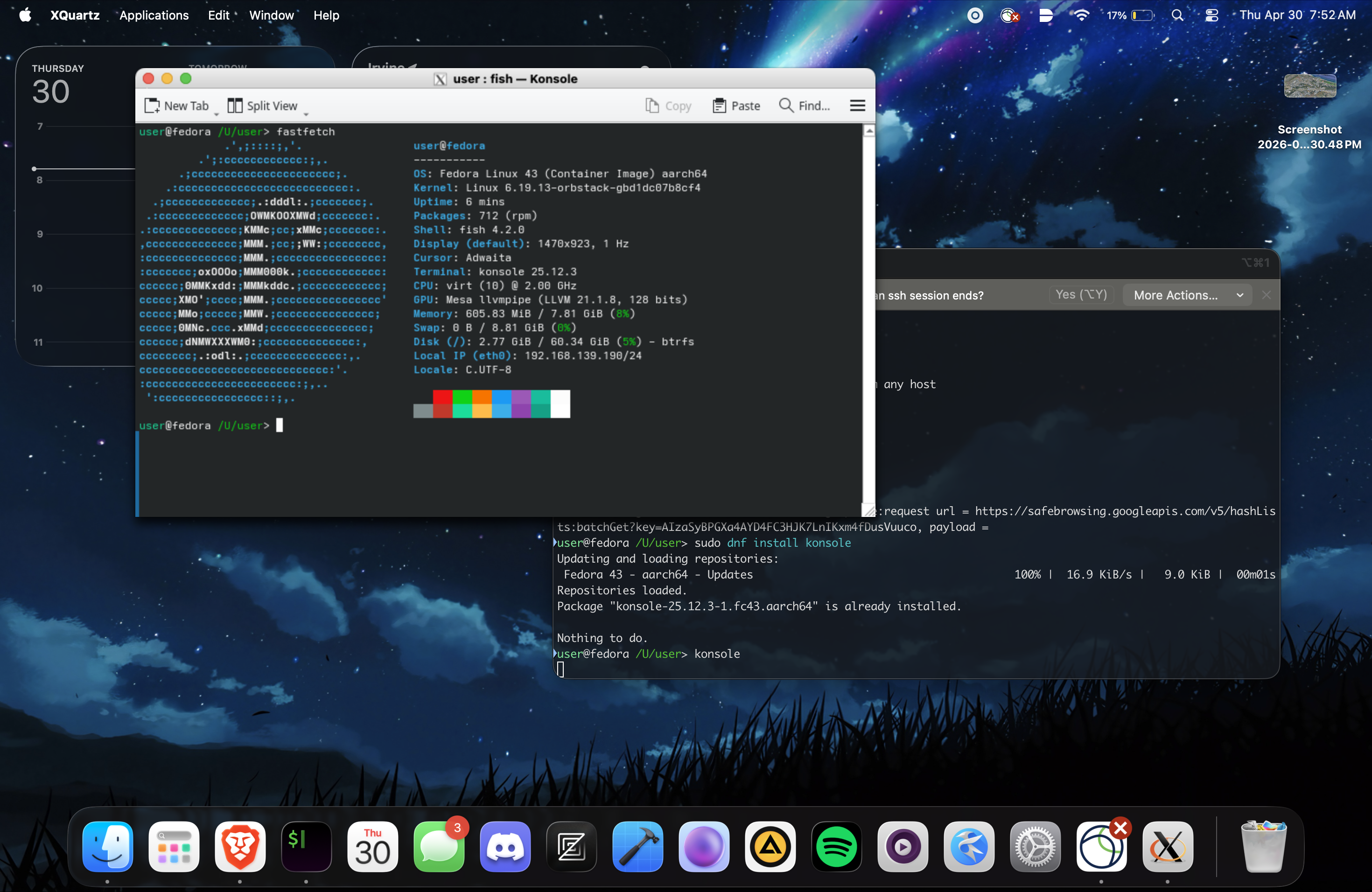 At some point in our lives, we must have all felt a little homesick in some way. Like if we’ve been away in another country for a while. But for me, my homesickness comes from not always having Linux at my fingertips. That’s because I primarily use a Macbook outside my dorm. And while Docker Desktop exists, it does not provide a complete experience like WSL. But now I can alleviate that by using OrbStack to run Linux on my Macbook, which I learned about from an ALUG@UCI member.
It provides a lightweight Linux platform on MacOS with support for Docker and virtualization. But with some tinkering, I discovered that you can mimic the WSL experience on MacOS with OrbStack combined with XQuartz.
Setting up OrbStack and XQuartz for WSL-like experience
As with everything, the first step is to install the required applications: OrbStack and XQuartz on your Mac. Once that’s done, follow these steps:
Setting up XQuartz
- Open XQuartz
- Go to
XQuartz>Preferences - Click the
Securitytab - Check
Allow connections from network clients - Click
OK - In the Terminal, enter
xhost +to allow connections from any host (this will need to be done on each startup)
Once you’ve set up XQuartz, you can proceed with setting up OrbStack.
Setting up OrbStack
- Open the OrbStack app
- Click
Machineson the left sidebar - Click the
+button to create a new machine - Choose a distribution (e.g. Fedora) and click
Create - Open the terminal and run
orb shellto start the machine - Set the
DISPLAYenvironment variable tohost.orb.internal:0in the Linux terminal - Install an application to test the display (e.g.
sudo dnf install firefox) - Run the application command (e.g.
firefox) to launch the application - You should see the application window appear on your Mac screen
Notes
- For Flatpak applications, you must run
flatpak override --user --share=network --socket=x11for X11 forwarding to work properly - Ubuntu, for some reason, takes awhile to do X11 forwarding. So I recommend Fedora or another distribution for faster results.
- Snap applications do not appear to support X11 forwarding out of the box. I have not done any troubleshooting with them, but they may require additional configuration to work properly.
So if you’ve ever wanted an intimate Linux experience on your Mac, OrbStack combined with XQuartz is a great solution. Because having a full-fledged Linux environment is much more enticing than a Docker container, which I was using before and had frustrations with.